

HuntDocs Logo
Get Paid
Invoicing
Integrated with:
Powered by Stripe QuickBooks
Stay Connected
Email Marketing
Run Your Operation
Lodging & Camps Animal Inventory
Articles Pricing
Game Management

Know what's on the ground — and what's still for sale.

HuntDocs tracks the animals your ranch or preserve sells — a standing herd, a hit list of named trophy animals, or birds released by the field — and keeps the numbers current as hunts get booked and taken. No more selling the same buck twice. No more counting bird cards in January.

Get Started
Whitetail on the North Ranch
Mature bucks on hand54
Booked by upcoming hunts6
Open to sell48
Pheasant on the East Field
Released this season1,200
Taken870
Left before your harvest limit150

Animal inventory that keeps itself current

Most ranches and preserves keep this in a spreadsheet, a notebook, or their head — herd counts on one page, the hit list on a phone, birds released on a clipboard, the hunter register in a binder by the door, and none of it connected to what's actually been sold. HuntDocs keeps the animals, the paperwork, and the bookings in one place: you enter what you have, and the numbers move on their own as hunts are booked and harvests are recorded. It works for high-fence and free-range operations, whitetail and exotics, red stag and fallow, and for preserves running pen-raised pheasant, chukar, and quail.

Counts that stay current

Enter what you have once. Bookings and harvests move the numbers for you, and every change is logged.

Your hit list

Trophy animals by name, with trail-camera photos, estimated score, and price — held the moment they're sold.

Birds through the season

Deliveries with the game farm's invoice attached, releases by field, recovery rates, and prepaid bird packages that count themselves down.

Never oversell

Your public calendar and checkout show sold out when the animals run out — not after someone has paid.

Know before you're over

Enter the share of released birds your state allows you to take, and we'll tell you as you get close — not after the season.

Your hunter register

Who hunted, when, their license number, what they took, and the band or tag numbers — plus season totals at the end of the year.

One screen answers the three questions that matter in season

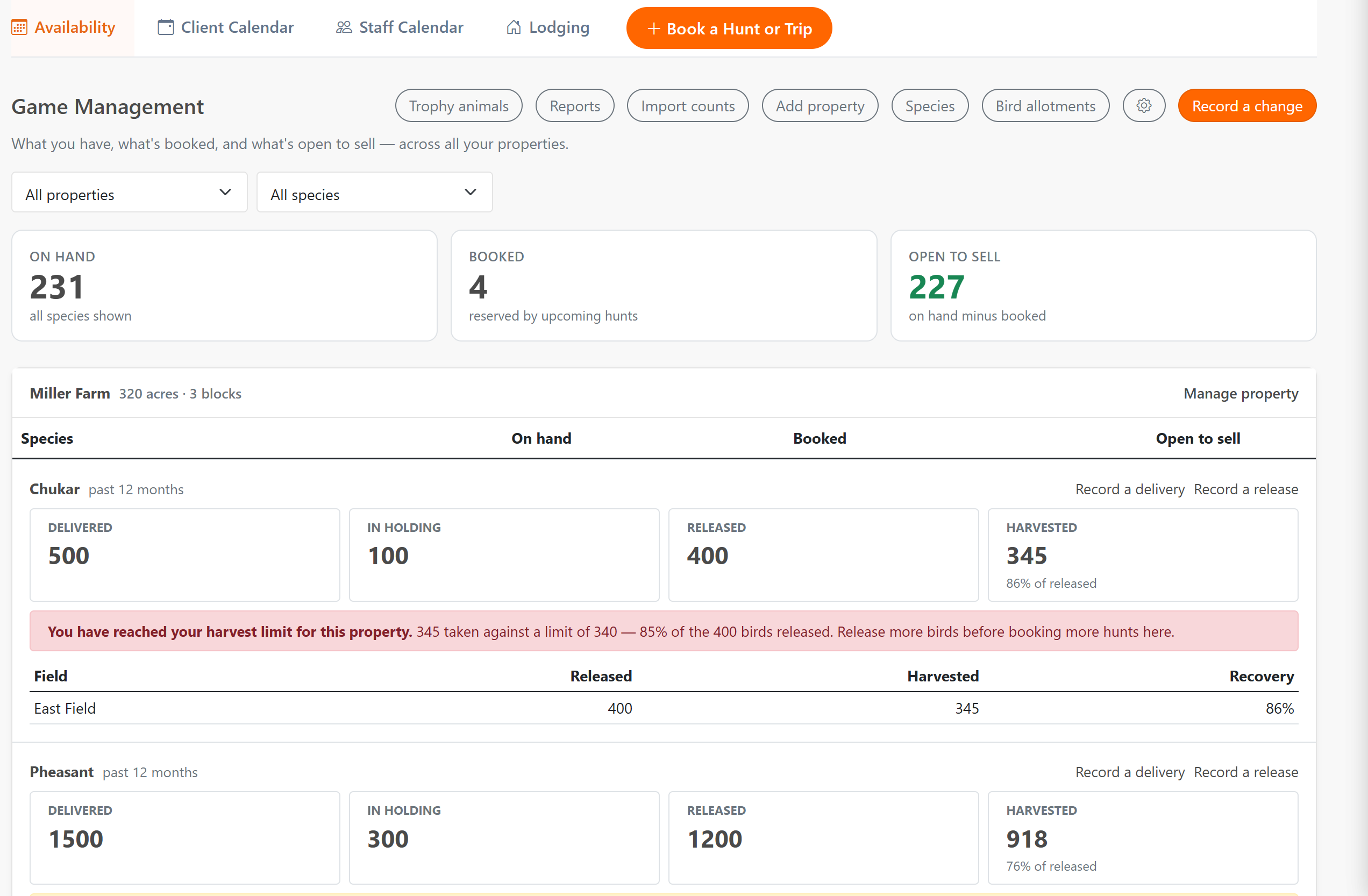
What do I have? What's booked? What's still open to sell? Your dashboard answers all three at once, by property and by species, so you can quote a caller without walking out to check or digging through a spreadsheet. And when a count stops matching reality — more animals taken than the books showed, or a harvest closing on the birds you released — HuntDocs turns it red and tells you, instead of letting the numbers drift all season.
Counts by species, sex, and age class — per property, pasture, or field
Booked figured from real bookings — not a second set of books
Every purchase, birth, delivery, release, move, and harvest in one running log
Game Management dashboard showing animals on hand, booked, and open to sell for each species and pasture
On hand, booked, and open to sell — by property and by species.

Sell an animal once, and bill what he's actually worth

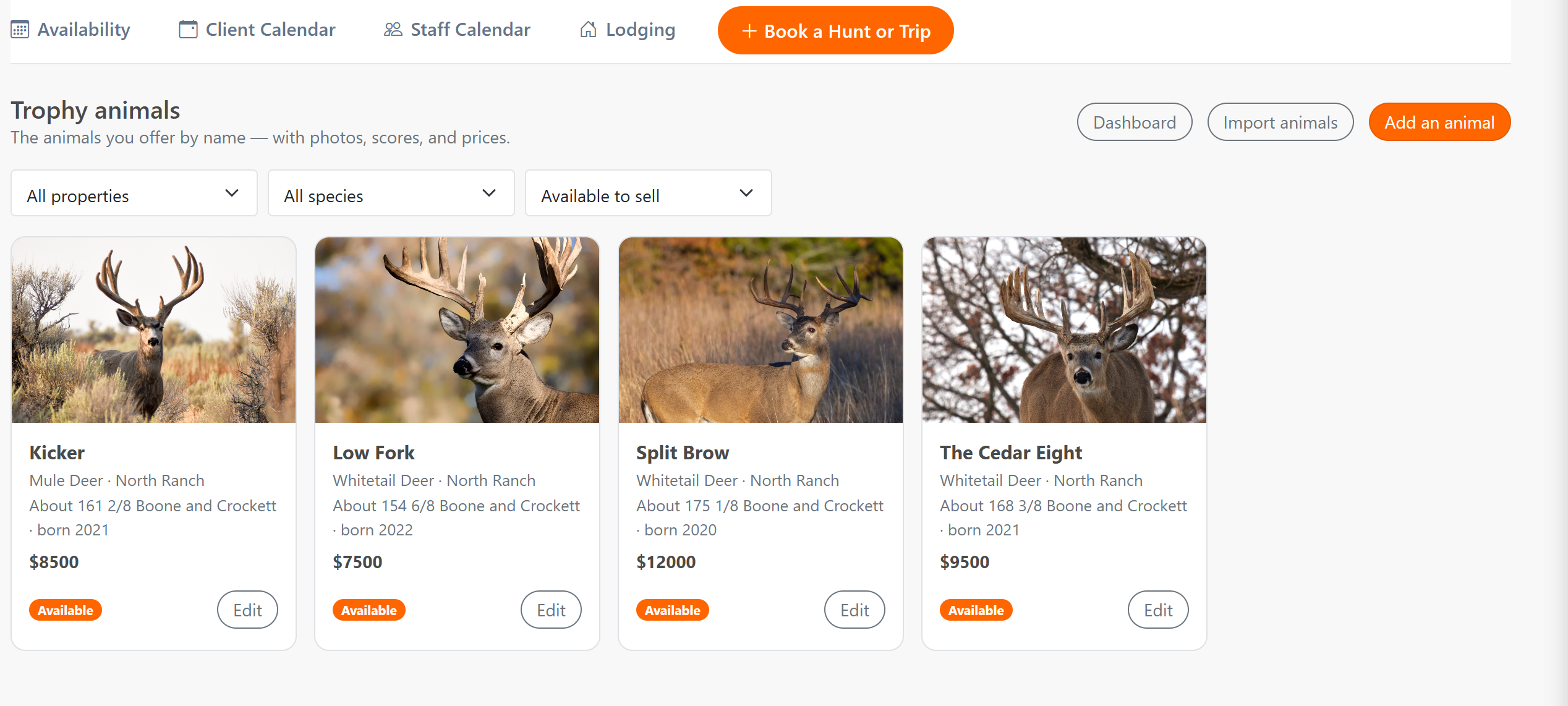
Build your hit list the way you already talk about it — a name, a trail-camera photo, an estimated score, a price. When a client books that buck, he's held, so the next caller can't be sold the same animal. If the trip cancels, he goes back on the available list on his own. And when he's taken, the score you measure sets the trophy fee right on the invoice you were already sending.
Reserve a specific animal while you build the trip, or from the group page later
A canceled hunt frees the animal automatically — and never takes one back that's been resold
Score-based trophy fees flow straight onto the client's invoice
Cull and management animals, animals bought from a breeder, and moves between pastures all tracked
Hit list of named trophy animals with trail camera photos, estimated scores, prices, and whether each is available or reserved
Your hit list — named, priced, and held the moment one is sold.

Shooting preserve management software, built around the way birds actually move

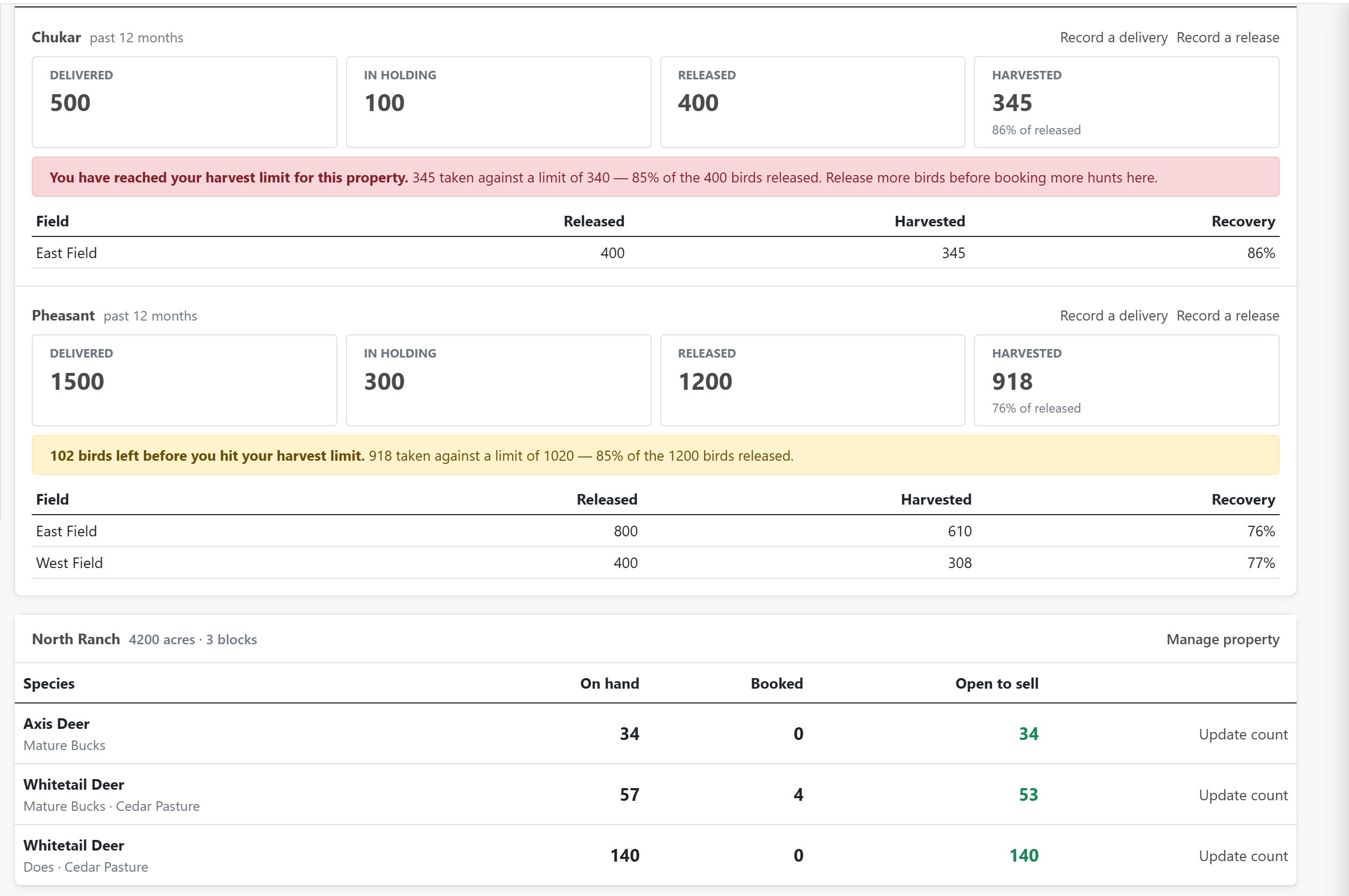
A preserve doesn't have a standing herd — it has a season. HuntDocs follows it: birds delivered from the game farm, held in your pens, released into a named field, and taken on a hunt. You get a daily record of birds released by species and field, harvest counts against them, and the recovery rate per field that tells you where the birds are working and how many to order next time. Clients who prepay for a package get a running count of birds purchased, used, and left — and the used column fills itself in from the hunts they've already taken.
Deliveries, holding pens, and releases by field and date
Recovery rate per field, season to date
Prepaid bird packages that count themselves down
The game farm's invoice kept with the delivery it paid for
Band numbers recorded one by one against the person who took them
Your harvest limit watched all season, not counted up at the end
Bird season tracking showing birds delivered, in holding, released by field, and harvested, with a warning as the harvest approaches the state limit
Delivered, held, released, taken — and a warning before you reach your limit.

The register in the binder by the door, kept for you

Whether you run deer behind a fence or release birds by the field, the paperwork looks much the same: who hunted, the dates, their hunting license number, what they took, and the tag or band numbers that went on it. HuntDocs builds that register from the bookings and harvests you already recorded — including the people who went home empty-handed, who are easy to leave off a handwritten page. When the season closes and someone wants totals, an annual summary adds them up for you: how many individuals hunted, and how many of each species you brought in, released, and took. Alongside those you get a current inventory, a harvest log, and a full history for any date range, each one downloadable as a spreadsheet or a printable file.
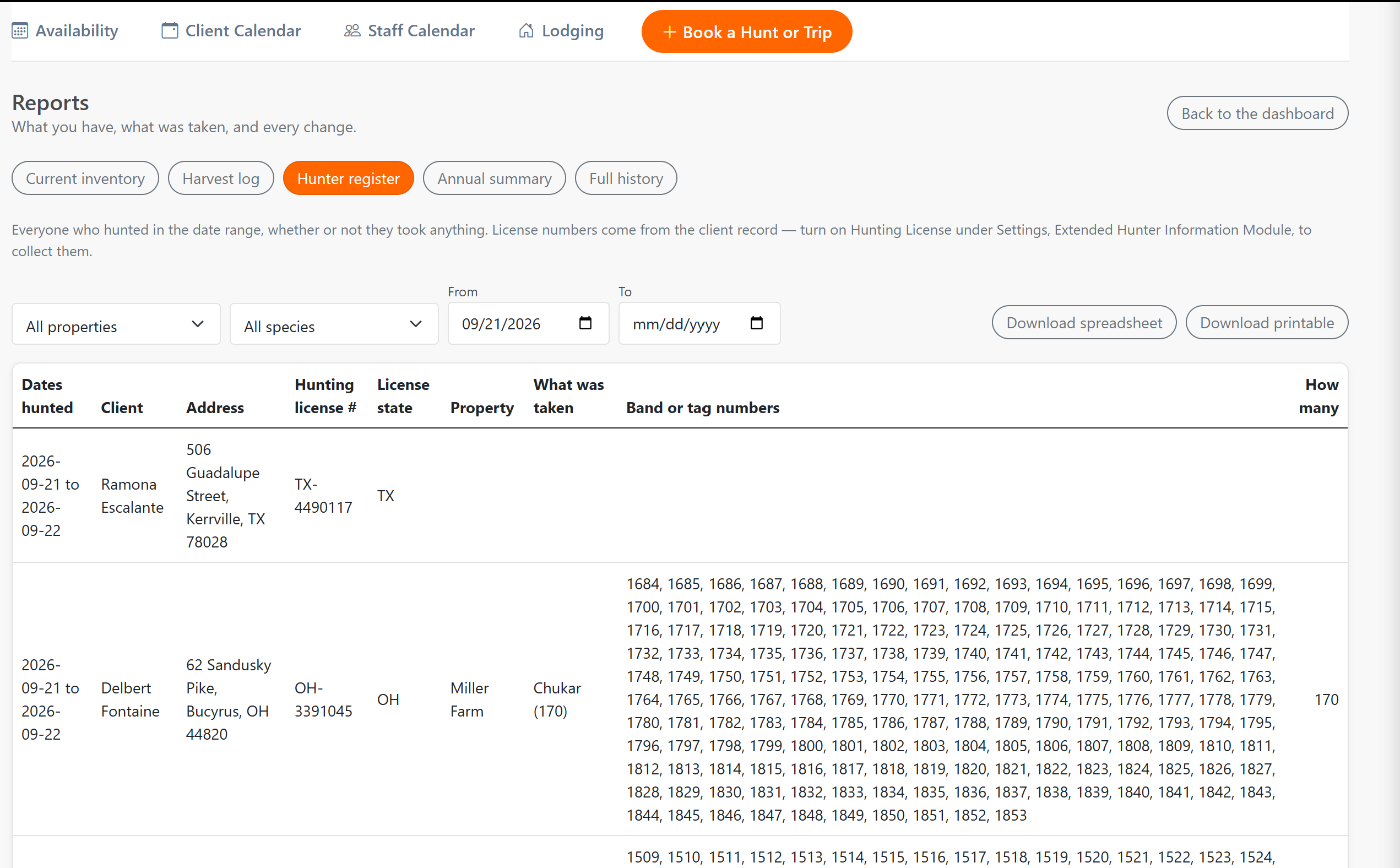
Hunting license number and address on the client record, entered once
Species taken by sex and age class, with the tag or band numbers
Everyone who hunted, whether or not they took anything
Property registration numbers and per-animal tag numbers
Health and testing details, receipts, and paperwork kept on file
Register, annual summary, inventory, harvest, and history reports to download or print
Hunter register listing everyone who hunted with the dates, address, hunting license number, property, and what they took
The hunter register, built from the bookings and harvests you already recorded.

It lives where you already book and bill

This isn't a separate program to keep in sync. Game Management sits inside the same HuntDocs that runs your bookings, contracts, invoices, and payments — so the animals and the money never disagree, and nobody has to remember to update the other system.

Common questions

Most operations start with a count — a helicopter or drone survey, a camera survey, or their own tally — and then lose track of it as the season goes on, because hunts, purchases, and losses all happen faster than the spreadsheet gets updated. HuntDocs takes your number as the starting point and keeps it current from there: animals bought in, born, moved between pastures, or taken on a hunt all adjust the count as they're recorded. Your entered number always wins — if a survey says something different, you decide whether to use it.

A trophy fee is the amount a client owes for the animal itself, usually on top of a day rate or package, and often priced by score bracket — so the final number isn't known until the animal is measured. HuntDocs is built for that: you record the harvest and the score, and the fee goes onto the client's invoice, whether they're booked on their own or as part of a group. Cull and management animals priced differently are handled the same way.

Yes, and it works differently on purpose. You mark a species as pen-raised birds, and instead of a standing count it follows the season: birds delivered, held, released into a field, and harvested — with a daily record of what went out and a recovery rate per field. If you sell prepaid bird packages, HuntDocs tracks how many each client bought, used, and has left, counting the used column from their recorded hunts.

States that license shooting preserves and controlled shooting areas generally ask the operator to hold a register naming every person who hunted — successful or not — with their address and hunting license number, the dates they hunted, the number and species they took, and the tag or band numbers that went on the game. HuntDocs builds that from records you already keep: the license number sits on the client record, the dates and people come from the bookings, and the species, counts, and band numbers come from the harvests. You pick a date range and download it as a spreadsheet or a printable file. The exact wording differs by state, so read your own permit conditions and check the columns against them.

That depends entirely on where you operate, and the answer is not the same from one state to the next — some set the limit below the number you released, and some set no limit at all. So HuntDocs doesn't guess: you enter your own percentage on the property, and your dashboard warns you as the harvest gets close to it and again when you reach it, with the numbers behind the warning shown plainly. Leave it blank and you'll still be told if the harvest ever reaches the number of birds you put out.

HuntDocs keeps the underlying records — what you hold, what moved, what was released, what was taken, plus tag and registration numbers, testing dates, and paperwork on file — and shapes those fields to the rules where you operate, including Texas and New Zealand. You can pull any of it as a spreadsheet or printable report, and at the end of a season an annual summary totals up how many individuals hunted and how many of each species you brought in, released, and took. What it doesn't do is file anything with an agency on your behalf, and most states want that year-end report on their own form — so you're copying totals across rather than counting them, and you should still check your state's requirements for how the records need to be submitted.

Yes. When a hunt is booked against animals you're tracking, those animals show as booked and come off what's open to sell — the same way a seat comes off a trip's capacity. When the harvest is recorded, the animal comes off your count for good. Cancel the trip and everything goes back. You can also choose whether an animal leaves your on-hand number when it's booked or when it's taken, depending on how your operation thinks about it.

No. Game Management is switched on when you want it. If you don't hold animals or release birds, leave it off and use HuntDocs for booking, contracts, payments, and the rest — nothing about your account changes.

Stop guessing what's left to sell.

See how HuntDocs keeps your animals, your bookings, and your invoices telling the same story.

Get Started